
Classes and Objects
- What is an Object and Class in Java?
- How to Create a Class in Java
- Creating Objects in Java
- Assigning Object References to Variables
- Adding Methods to a Class
1. What is an Object and Class in Java?
A class in Java is a blueprint for creating objects, while an object is an instance of a class. A class defines the structure and behavior shared by a set of objects. It contains variables (fields) and methods, which are called class members. Classes form the foundation of encapsulation in Java. Each object of a class contains the structure and behavior defined by the class. Objects are sometimes called instances of a class.
Methods describe what an object can do or what actions can be performed on it. Variables describe the properties or characteristics of the object.
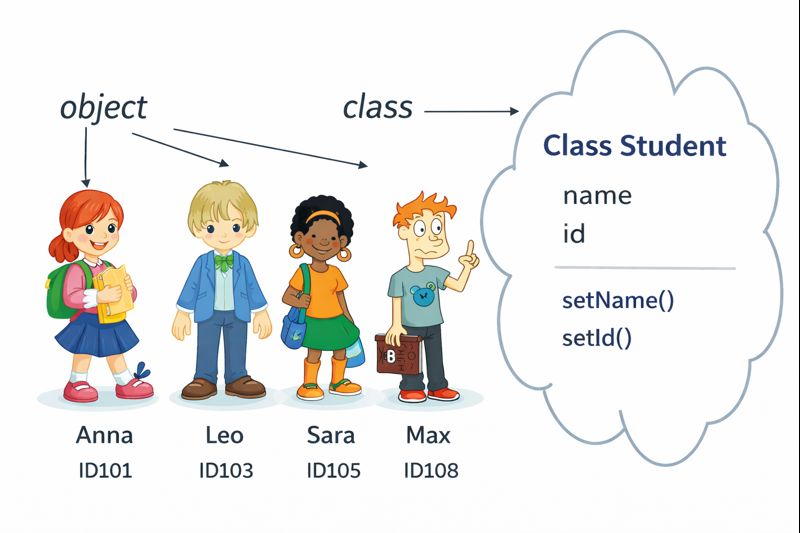
Consider the image below. A Student class is declared with variables name and id, as well as methods setName() and setId() to assign values. Based on this class, multiple objects are created: Anna, Leo, Sara, Max. Each object (student) has a name and id, but their values differ.
2. How to Create a Class in Java
Let's see how to create a class in Java. A simplified general class definition form:
class ClassName {
    type instanceVariable1;
    type instanceVariable2;
    // ...
    type instanceVariableN;

    type methodName1(parameters) {
        // method body
    }

    type methodName2(parameters) {
        // method body
    }
    ...
    type methodNameN(parameters) {
        // method body
    }
}
After the class keyword, the class name is specified. Inside the class body, variables and methods are declared. There can be any number of them.
For example, a Box class has three main properties: width, height, and depth, represented by variables:
public class Box {
    double width;
    double height;
    double depth;
}
3. Creating Objects in Java
Declaring a class only creates a blueprint, not an actual object. To create a Box object in Java, use the following operator:
Box myBox = new Box();When a class instance is created, an object is created with its own copy of each instance variable defined in the class.
Creating class objects is a two-step process:
- Declare a variable of the class type. This variable does not define an object but can reference one:
Box myBox; - Create the object. Using the new operator, memory is dynamically allocated for the object and a reference is returned:
myBox = new Box();
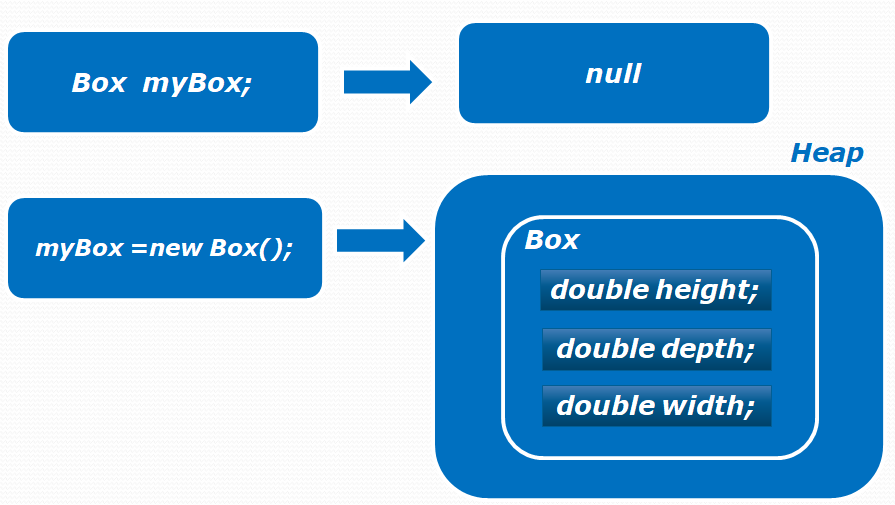
After creating a Box object, all class variables are assigned default values (0 for numbers, false for boolean, null for reference types). To access or modify a variable, use the object variable name:
public class BoxExample1 {
    public static void main(String[] args) {
        Box myBox = new Box();
        myBox.width = 10;
        myBox.height = 20;
        myBox.depth = 15;
        double volume = myBox.width * myBox.height * myBox.depth;
        System.out.println("Volume is " + volume);
    }
}
In the following example, two Box objects are declared with their own values. Changes in one object's instance variables do not affect the other:
public class BoxExample7 {
    public static void main(String[] args) {
        Box myBox1 = new Box();
        Box myBox2 = new Box();
        double volume;
        myBox1.width = 10;
        myBox1.height = 20;
        myBox1.depth = 15;

        myBox2.width = 3;
        myBox2.height = 6;
        myBox2.depth = 9;

        volume = myBox1.width * myBox1.height * myBox1.depth;
        System.out.println("Volume is " + volume);

        volume = myBox2.width * myBox2.height * myBox2.depth;
        System.out.println("Volume is " + volume);
    }
}
4. Assigning Object References to Variables
Sometimes, two variables may point to the same object in memory:
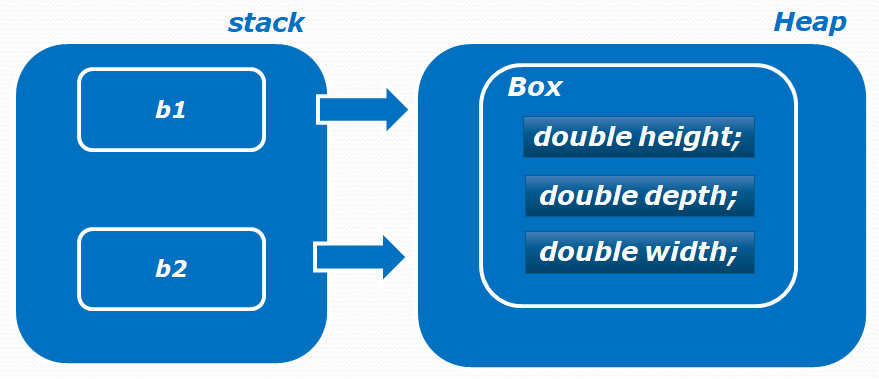
Here's an example. When b1 is declared, a new object is created. When b2 is declared, it receives a reference to b1 instead of a new object. Values are assigned through b1, then the width via b2:
public class BoxExample6 {
    public static void main(String[] args) {
        Box1 b1 = new Box1();
        Box1 b2 = b1;

        b1.width = 10;
        b1.height = 20;
        b1.depth = 15;

        b2.width = 3;

        System.out.println("Width: " + b1.width);
        System.out.println("Width: " + b2.width);
    }
}
Since both variables reference the same object, the output is:
Width: 3.0
Width: 3.0
Changes through one variable are visible through the other.
5. Adding Methods to a Class
Besides variables, a class can contain methods to hide implementation details and avoid code duplication. In this example, the Box class has two methods: getVolume() to calculate the box volume and setDim() to set box dimensions. Note that the methods are non-static, allowing access to class variables.
public class Box {
    double width;
    double height;
    double depth;

    double getVolume() {
        return width * height * depth;
    }

    void setDim(double w, double h, double d) {
        width = w;
        height = h;
        depth = d;
    }
}
Two Box objects are created. Instead of initializing variables manually, setDim() sets width, height, and depth. Non-static methods must be called for a specific object. Similarly, getVolume() calculates volume for each object:
public class BoxExample2 {
    public static void main(String[] args) {
        Box myBox1 = new Box();
        Box myBox2 = new Box();

        myBox1.setDim(10, 20, 15);
        myBox2.setDim(1, 5, 5);

        System.out.println("Volume: " + myBox1.getVolume());
        System.out.println("Volume: " + myBox2.getVolume());
    }
}
Comments